

Sound Toggle
Overview
• Sound Toggle is a lightweight and efficient Android application designed to streamline the management of your device's audio profiles.
• By integrating directly into the system's Quick Settings panel, the app eliminates the need to navigate through complex menus to adjust notification settings.
Core Functionality
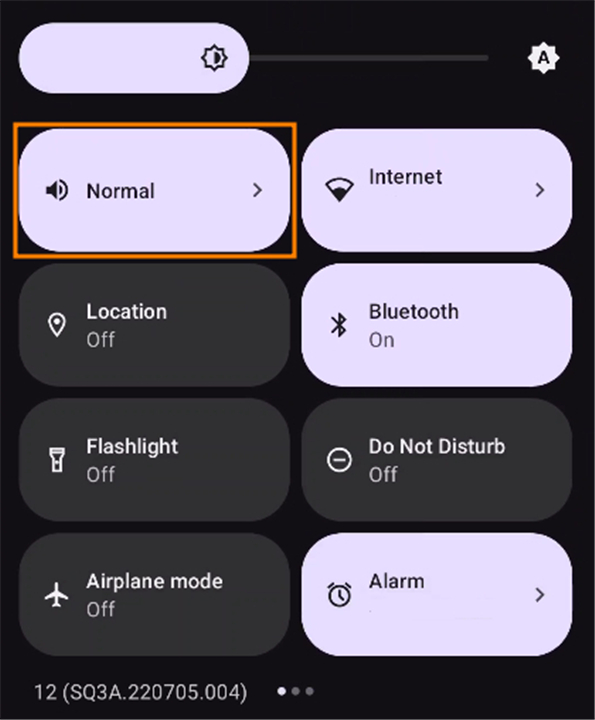
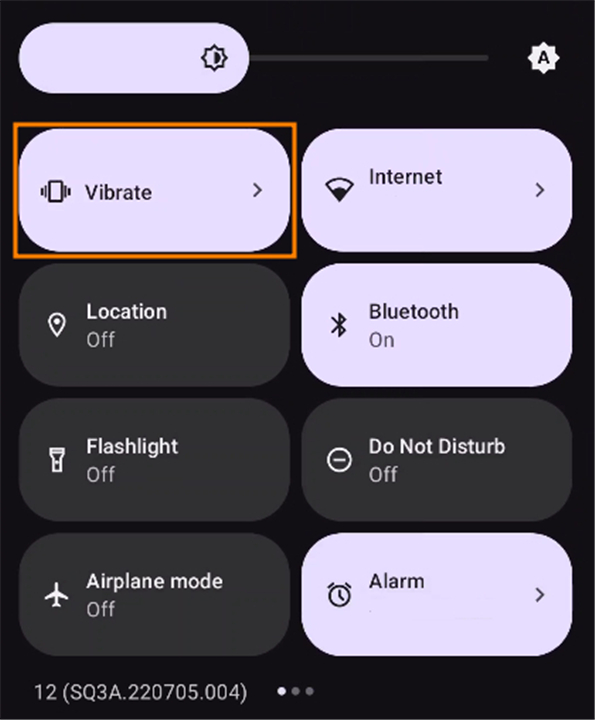
• Rapid Mode Switching: Seamlessly cycle through Normal, Vibrate, and Silent modes with a single gesture.
• Quick Settings Integration: The application places a custom tile in the Android notification shade, providing instant access to your sound settings from any screen or application.
• Minimalist Resource Usage: Built with a focus on efficiency, the app operates silently in the background without draining battery life or occupying significant system memory.
Key Features and Benefits
• Simplified User Experience: Designed for users who frequently transition between environments such as meetings, classrooms, or high-noise public areas.
• One-Tap Operation: Eliminates the multi-step process of unlocking the device, opening settings, and manually adjusting sound sliders.
• Accessibility: Improves device usability by providing a tactile and immediate way to silence a ringing phone, preventing social disruption.
• Privacy and Focus: Quickly enabling Silent or Vibrate mode ensures that incoming calls and notifications do not disturb work or personal downtime.
Installation and Setup
• System Requirements: Optimized for a broad range of Android versions, ensuring compatibility with most modern devices.
• Configuration: Once installed, users simply edit their Quick Settings panel, drag and drop the Sound Toggle tile into the active area, and the application is ready for immediate use.
• Permissions: The application requests only the necessary permissions required to modify system ringer settings, maintaining a focus on user privacy and security.
Quickly Switch Audio Mode
• Sound Toggle is the ideal solution for users seeking a streamlined, unobtrusive, and highly functional tool to maintain control over their device audio states throughout the day.
FAQ
Q: How does the app integrate with my Android device?
A: The application integrates directly into your device's Quick Settings panel. Once you have installed it, you simply add the custom Sound Toggle tile to your notification shade, allowing you to control your sound settings from any screen on your phone.
Q: Is this app going to drain my battery or slow down my phone?
A: Not at all. Sound Toggle is designed with a minimalist architecture, meaning it operates quietly in the background without consuming significant system memory or impacting your battery life.
Q: How do I switch between sound modes using this app?
A: Switching modes is very simple. After adding the tile to your Quick Settings, you just tap the icon to cycle through the different audio profiles. Each tap moves you from Normal to Vibrate, and then to Silent mode in one smooth gesture.
Version History
v1.3.4——20 Jul 2026
Instantly switch between Normal, Vibrate, and Silent modes with Sound Toggle. Add a custom Quick Settings tile to your Android device. Download the latest version of Sound Toggle to enjoy new features and updates immediately!
*1.3.4
Fix Android 17 issue that it didn't keep the last sound setting after reboot.
*1.3.3
Fix Android 17 Issues.
Fix wrong icon showing in silent mode for some devices.
*1.3.2
Fix Force Close Issue











Ratings and reviews
There are no reviews yet. Be the first one to write one.