

IdeaMemo
Overview
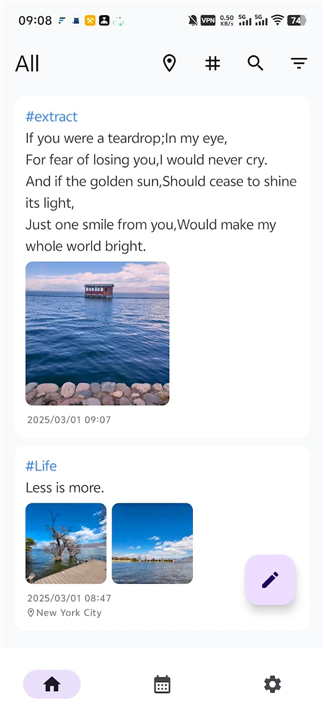
• IdeaMemo is a lightweight Android application designed for capturing quick thoughts and creative inspirations.
• It streamlines the note-taking process through a card-based interface, focusing on efficiency, user control, and minimal overhead.
Privacy and Data Control
• The application requires zero system permissions to operate, ensuring maximum user privacy.
• All runtime data is stored exclusively in a local database rather than on external servers.
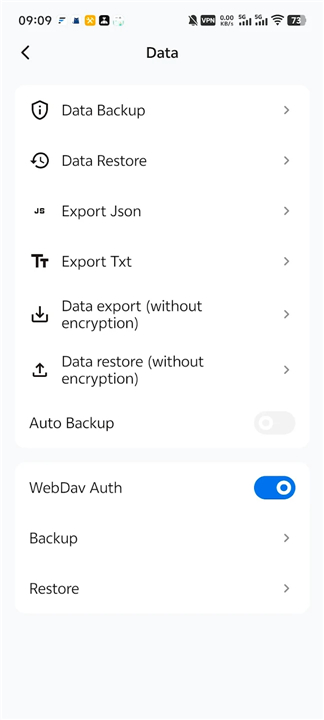
• Users can choose to synchronize their data using a personal WebDAV private cloud for secure backups and cross-device management.
Content Organization
• Notes are organized using an efficient tag-based indexing system for rapid categorization.
• The interface supports a mixture of text and graphics, allowing for rich media notes.
• The card-style format is specifically optimized for brief inspirations and short-form content rather than lengthy documentation.
Review and Visualization
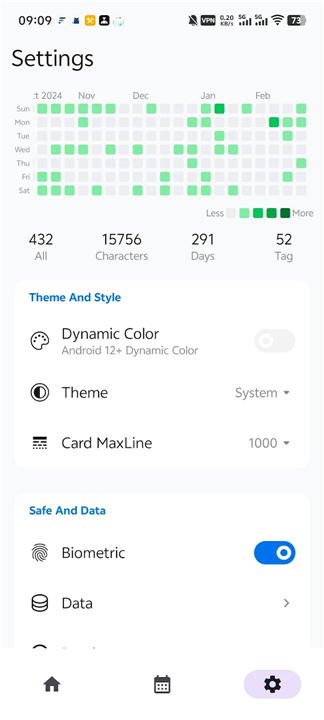
• A built-in calendar view allows users to track their entries chronologically.
• A heatmap feature provides a clear visual representation of note-taking frequency and activity patterns.
• The random walk function facilitates the rediscovery of past ideas by surfacing notes in an unpredictable, explorative manner.
Development and Ethics
• The software is entirely free to use with no hidden subscription fees or locked features.
• All source code is hosted on GitHub, allowing the community to view, audit, and collaborate on the project.
• The developer uses the application personally, ensuring that it receives continuous updates and meaningful refinements based on real-world usage.
• GitHub Repository: https://github.com/ldlywt/IdeaMemo
FAQ
Q: How does IdeaMemo handle my privacy?
A: Your privacy is fully protected because IdeaMemo requires zero system permissions to operate. It cannot access your sensitive phone data, ensuring that your personal thoughts remain entirely private.
Q: Where is my data stored when I use the app?
A: All runtime data is stored exclusively in a local database directly on your Android device. IdeaMemo does not automatically upload your notes to external third-party servers, giving you complete ownership of your information.
Q: Can I back up or sync my notes across devices?
A: Yes, you can easily sync your data using your own personal WebDAV private cloud. This gives you a secure, private way to maintain backups and manage your notes across multiple devices without sacrificing control over your data.
Version History
v3.1.0——27 Jul 2026
Capture the fleeting moments and sudden inspirations. Download the latest version of IdeaMemo to enjoy new features and updates immediately!
*3.1.0
修改为左侧边栏模式
优化输入弹框的交互方式
*3.0.0
IdeaMemo 更新日志 (v3.0.0)
• 全新视觉交互:UI 大版本升级,采用悬浮圆角底部导航栏,优化了图标状态显示及 FAB 交互体验。
• 新增统计分析:上线笔记统计功能,数据分布与趋势一目了然。
• 局域网查看:支持通过电脑端浏览器直接查看手机笔记,实现轻量化跨端浏览。
• 多语言支持:新增多语言配置,首页标题及核心界面已适配国际化。
• 操作优化:整合首页顶部菜单,调整列表布局间距,提升大屏及手势操作顺滑度。
*2.6.1
颜值即正义 | Visual Glow-up
•新增【画廊模式】:瀑布流布局瞬间变身“小红书”,只看图也赏心悦目。
◦New [Gallery Mode]: Xiaohongshu-style waterfall grid. Pure visual bliss for your photo notes.
交互大升级 | UX Overhaul
• iOS 同款滚轮选择器:日期选择再也不用点点点,丝滑滚动,手感拉满。
• iOS-style Wheel Picker: Effortless date selection with a premium scrolling feel.
功能全补完 | Feature Power-up
• 多语言自由切换:支持简/繁/英,你的 App 你做主。
• Language Switcher: Easily toggle between SC, TC, and English in-app.
• WebDAV 逻辑重构:支持带时间戳的 HTML 压缩包备份,电脑端网页打开。
• WebDAV 2.0: Backup as timestamped HTML zips. View your memos beautifully on any PC browser.











Ratings and reviews
There are no reviews yet. Be the first one to write one.