
Artecture Draw, Sketch, Paint APK
5.2.0.4
Artecture Draw, Sketch, Paint
Artecture Draw, Sketch, Paint APK
Download for Android


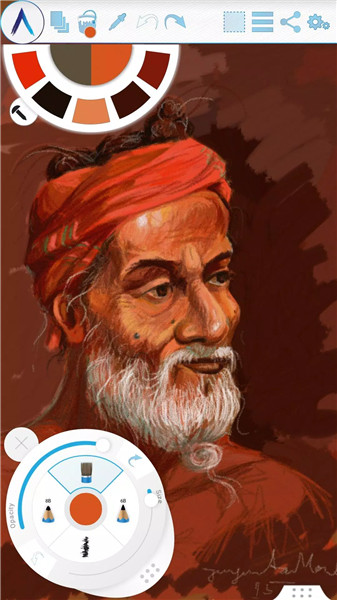

Key Features of Artecture Draw, Sketch, Paint
Realistic Tools:
Artecture offers over 30 unique, high-quality, and realistic drawing and painting tools.
From pencils for lifelike sketches to oil brushes for expressive strokes, the app caters to various artistic styles.
Layered Creativity:
Create, remove, lock, adjust visibility, and reorder layers.
Experiment with different effects on selected layers, such as sepia, inverse, blur, and colorization.
Symmetry and Precision:
Explore vertical, horizontal, and concentric symmetry.
Tracing with automatic color pick, template coloring, and image import enhance precision.
Geometric Shapes and Pen-Only Mode:
Draw freehand or use geometric shapes like lines, rectangles, and circles.
Activate pen-only mode for palm rejection during drawing.
Canvas Rotation and Multi-Touch Shortcuts:
Rotate the canvas for comfortable drawing angles.
Use multi-touch shortcuts for efficient navigation.
Color Palette and Tool Presets:
Customize your color palette with favorite defaults and a color picker.
Access floating favorite colors and tool palettes.
Selection and Text Insertion:
Select rectangular or freehand areas for copying, pasting, rotating, and mirroring.
Insert, resize, rotate, and mirror text within your artwork.
Export and Auto-Save:
Export your creations to standard image formats (JPEG, PNG, BMP).
Enjoy auto-save functionality to prevent accidental data loss.
Storage Options:
By default, artworks save in the “Artecture” folder on your device with the .bme file format.
You can also export to .bmp image files or change the storage location.
Sharing and Community:
Share your artworks on Facebook and PenUp directly from the canvas or gallery.
Collaborate with fellow artists and learn from the Artecture community.
How to Use Artecture
Download and Install:
Install Artecture Draw, Sketch, Paint.
Log in using your Samsung account.
Create Your Masterpiece:
Set up your canvas with preferred themes and colors.
Experiment with different tools and layers.
Explore Symmetry and Effects:
Activate symmetry modes and explore different effects.
Use tracing and templates for inspiration.
Save and Share:
Save your artworks in the default .bme format or export as .bmp images.
Share your creations with friends and fellow artists.
Benefits of Artecture Draw, Sketch, Paint
Artistic Freedom: Express yourself without limitations.
Community Connection: Connect with other artists and learn from their techniques.
Mobile Convenience: Create art on the go.
No Ads, No Hassle: Enjoy a distraction-free experience.
What's New in the Latest Version 5.2.0.4
Last updated on Feb 8, 2019
Version Number: 5.2.0.4
• Fixed the issue of “Permission required” for non Samsung devices.
• Fixed crashes/can’t save issues.
Version Number: 5.2.0.2
• Added dynamic permission handling.
• Some Bug fixes.
Version Number: 5.1.2.0
• Auto Save: Progress will be automatically saved periodically.
• Bug Fix: Minor Bug Fixes.









Ratings and reviews
There are no reviews yet. Be the first one to write one.