

Download Twitter Videos APK
2.0.125
Download Twitter Videos
Download Twitter Videos APK
Download for Android



The Twitter Video Downloader app is a simple and efficient tool designed to make downloading videos and GIFs from Twitter an easy task. With just a few simple steps, you can download your favorite content directly to your device.
Easy and Fast Downloading
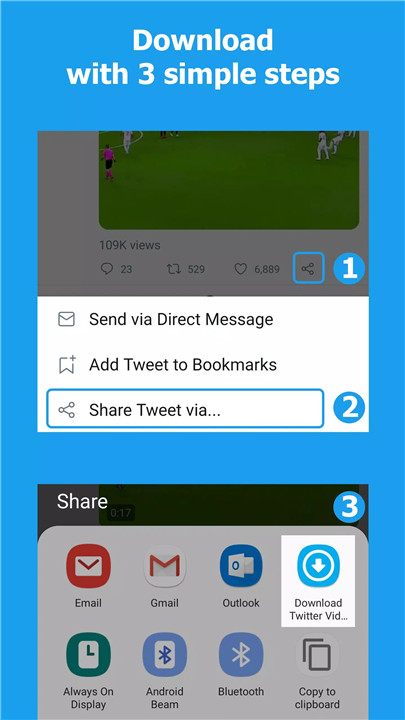
The Twitter Video Downloader app provides a quick and simple process to download videos and GIFs. Just click the share icon under the tweet with the video you want, select "Download Twitter Videos," and hit the download button. Alternatively, you can simply copy the tweet link and paste it into the app for the download.
Save Internet Traffic
By using a database to save your previous queries, the app ensures that you avoid downloading the same video or GIF more than once. This helps save your internet traffic and ensures that your downloads are managed efficiently.
Customizable Video Resolutions
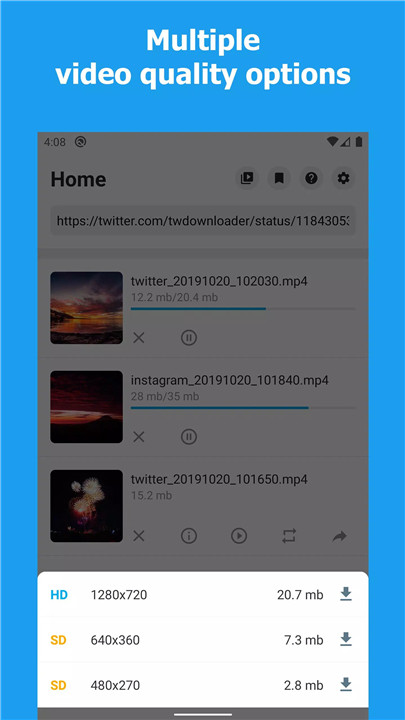
With the option to choose different video resolutions (if available), the app gives you control over the quality of the video you download. You can easily pick the best resolution to fit your storage or viewing needs, all with the click of a button.
Built-in Video Player & Share Function
The app includes a built-in video player, allowing you to view your downloaded content directly within the app. Plus, it makes sharing videos even easier by allowing you to share your downloads to other social apps like Snapchat, Instagram, WhatsApp, and Facebook with just a tap.
Multi-Task Downloads
The Twitter Video Downloader app supports multi-task downloading, which means you can download multiple files at once. Whether it's a batch of funny GIFs or several videos, the app handles it all smoothly.
Lightweight & Efficient
The app is lightweight, with a size of only 2.9MB, making it easy to install and use without taking up too much space on your device. It provides an excellent user experience with minimal advertising, so you can focus on downloading your content.
External Storage Support
Once downloaded, your videos and GIFs are saved to external storage, allowing you to access them through other apps like your gallery, video player, or file manager.
FAQs
1. How do I download Twitter videos using this app?
To download Twitter videos, click the share icon below the tweet containing the video, select "Download Twitter Videos," then click the download icon and choose your preferred resolution.
2. Can I download multiple videos at once?
Yes, the app supports multi-task downloading, allowing you to download multiple videos or GIFs simultaneously.
3. Can I choose the video resolution when downloading?
Yes, if there are multiple video resolutions available, you can select the one that best suits your needs.
4. Where are my downloaded videos stored?
The videos are saved to external storage on your device, allowing you to access them through other apps like your gallery or video player.
5. Is this app free to use?
Yes, the Twitter Video Downloader app is free to use, with minimal ads, offering a seamless and enjoyable user experience.
Version History
v2.0.125—28 Jun, 2024
Support download all videos(4) in a tweet.
Download GIF as GIF format.
Download all Instagram videos/photos with one click.
Swipe video player.
Background download.
New UI.
Bugs fixed.
v2.0.124—27 Jun, 2025
Support download all videos(4) in a tweet.
Download GIF as GIF format.
Download all Instagram videos/photos with one click.
Swipe video player.
Background download.
New UI.
Bugs fixed.
v2.0.123—7 Jun, 2024
Support download all videos(4) in a tweet.
Download GIF as GIF format.
Download all Instagram videos/photos with one click.
Swipe video player.
Background download.
New UI.
Bugs fixed.









Ratings and reviews
There are no reviews yet. Be the first one to write one.