

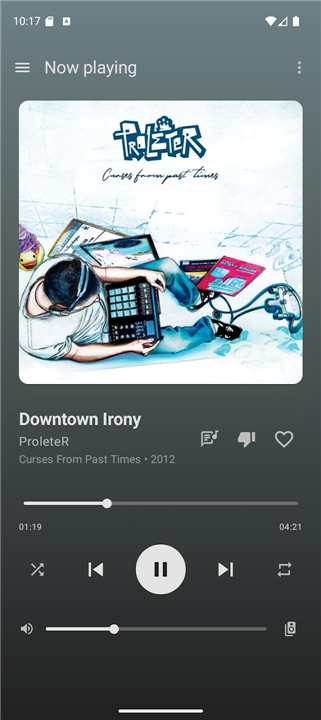
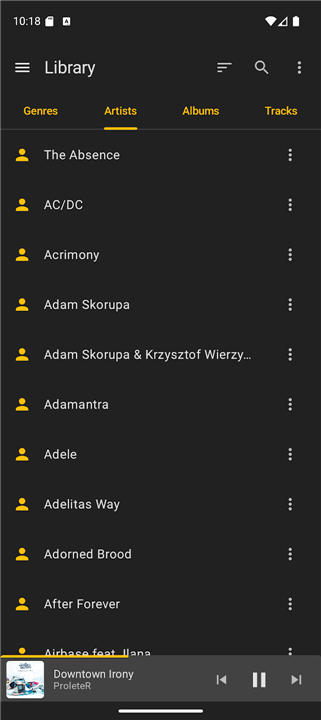
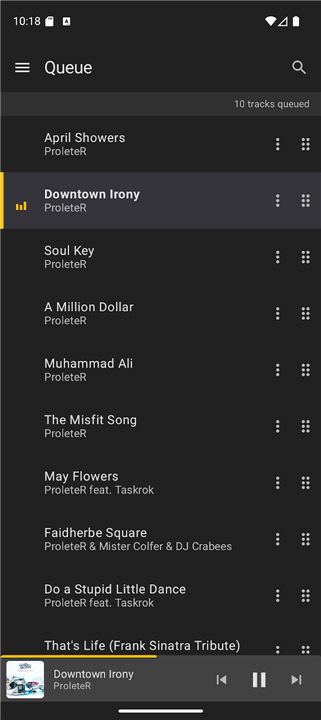
MusicBee Remote
Overview
• Take total command of your desktop music experience from anywhere in your home.
• MusicBee Remote seamlessly connects your Android device to MusicBee via Wi-Fi, turning your phone into the ultimate wireless sound controller.
Effortless Playback Control
• Complete wireless control: play, pause, skip, seek, and adjust volume using screen controls or physical device buttons.
• Smart audio management: automatically pauses or lowers volume for incoming phone calls.
• Integrated convenience: manage tracks directly via lock screen controls, headset buttons, or resizable home screen widgets.
Deep Library & Queue Management
• Comprehensive browsing: explore your music collection by artist, album, genre, track, or playlist folders.
• Dynamic queue control: reorder, search, or instantly jump to any track on the fly.
• Expanded listening: stream online radio stations and instantly play or shuffle any selection.
Rich Media & Track Insights
• Sleek design: navigate a modern Jetpack Compose interface with flexible light and dark themes.
• Live metadata and lyrics: view high-resolution album art, composer details, extended file stats, and synchronized lyrics.
• Music curation: rate tracks with half-stars and toggle Last.fm love, ban, and scrobbling features.
System Requirements
• Desktop setup: MusicBee version 3.0 or later with the companion plugin installed.
• Mobile setup: Android 6.0 or higher connected to the same Wi-Fi network as your computer.
Open Source & Credits
• Transparent and free: both the mobile app and companion plugin are fully open source under the GPLv3 license.
• Independent project: an unofficial community utility, not affiliated with MusicBee or Steven Mayall.
• Creative credits: logo concept by Jordan Georgiadis; UI design, assets, and promo graphics by Tasos Papazoglou-Chalikias; store artwork by ProleteR (CC BY-NC-ND 3.0).
• Setup & resources: access companion plugins, source code, and installation guides at mbrc.kelsos.net.
FAQ
Q: What do I need to install on my computer to get MusicBee Remote working?
A: To get everything running smoothly, you need to have a desktop computer running MusicBee version 3.0 or later. Additionally, you must download and install the dedicated companion plugin on your computer, which acts as the bridge that allows MusicBee to communicate with the Android mobile application.
Q: Are there any specific system requirements for my Android device to run the app?
A: Your Android phone or tablet simply needs to be running Android version 6.0 or higher. This ensures compatibility with the modern interface, widgets, and advanced background playback controls built into the system.
Q: Do my computer and phone need to be on the same internet connection for this to work?
A: Yes, both your computer running MusicBee and your Android device must be connected to the exact same Wi-Fi network. This allows the two devices to securely discover each other and establish a reliable local connection.
Version History
v1.6.1——20 Aug 2026
MusicBee Remote is a remote control application for use with MusicBee player. Download the latest version of MusicBee Remote to enjoy new features and updates immediately!
*1.6.1
This release is focused on stability and fixes several crashes reported in 1.6.0.
- Fixed out-of-memory issues that could occur while syncing the now-playing queue
- Fixed crashes caused by duplicate entries in the now-playing list
- Fixed a crash on Android 12+ when starting the background service
- Home screen widgets now rebuild correctly after an app update, clearing stale controls
- A progress bar now shows while the now-playing queue is syncing so you know what's happening
*1.6.0
MusicBee Remote 1.6.0 - our biggest update yet!
• Completely redesigned interface, rebuilt from scratch
• New light theme alongside dark mode
• Star ratings with half-stars, plus Love and Ban
• Sort genres, artists, albums and tracks
• Album grid view, great on tablets
• Resizable home screen widgets
• Play all / Shuffle all, and Go to Album/Artist
• Track details panel with extended metadata
• Faster network discovery and more reliable connections
• Many crash fixes and stability improvements
*1.5.1
- Fixes an issue where the last playing track information would not properly persist.
- Fixes an issue where pressing the up volume button once would decrease the volume.
- Fixes a crash when attempting to send debug logs via the Feedback screen.
- Fixes an issue that would cut the album title when in the album library tab.
- Fixes an issue that would fail to properly sync album covers after the first sync.











Ratings and reviews
There are no reviews yet. Be the first one to write one.