

SOS Flashlight Morse Code Tool APK
1.0.3
SOS Flashlight Morse Code Tool
SOS Flashlight Morse Code Tool APK
Download for Android
SOS Flashlight Morse Code Tool
Your Universal Communication Lifeline
• The SOS Flashlight App redefines personal safety by turning your smartphone into a sophisticated Morse code transmitter.
• Whether you find yourself in a critical emergency or simply wish to master a classic form of communication, this tool empowers you to bridge the gap between silence and being heard.
• By utilizing multiple sensory channels, it ensures that your message reaches its destination regardless of the environment.
Versatile Transmission Methods
• Visual LED Signaling: Harness the power of your camera's flash to project high-visibility light signals across long distances.
• Tactile Vibration: Communicate discreetly or in low-visibility environments through precise, rhythmic haptic pulses.
• Acoustic Tones: Broadcast clear 700Hz audio frequencies designed for optimal clarity and auditory range.
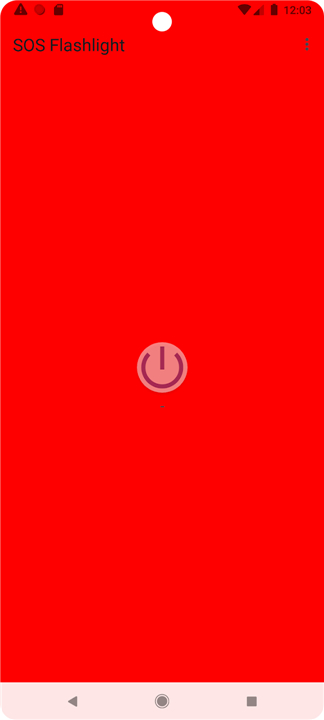
• Illuminated Display: Transform your entire screen into a bright beacon to signal for help in total darkness.
Advanced Core Features
• Instant Access Widget: Launch your flashlight with a single tap directly from your home screen for an immediate response when seconds count.
• Uninterrupted Operation: Maintain your signal transmission even while multitasking or when your device screen is locked.
• Expressive Customization: Effortlessly convert any written message into accurate Morse code sequences for specialized communication.
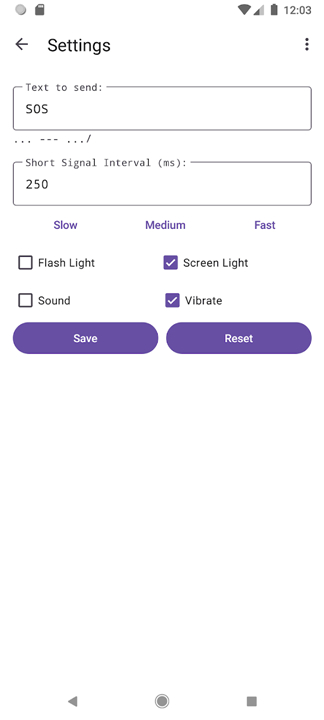
• Variable Speed Control: Adjust the transmission tempo from slow to fast to ensure your message is received clearly under any conditions.
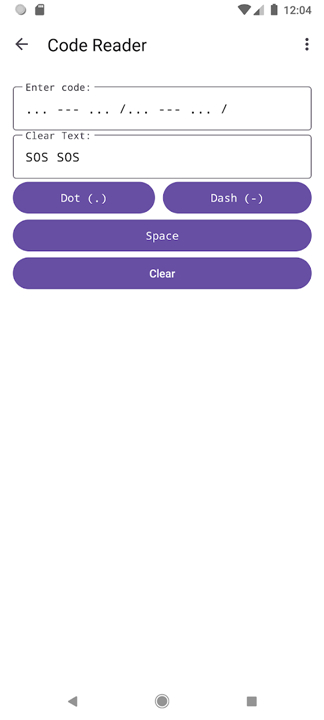
• Integrated Decoder: Translate incoming Morse code back into readable text, turning your device into a true two-way communication hub.
• Selective Signaling: Choose exactly how you want to communicate by toggling individual transmission modes on or off based on your specific needs.
Simple and Effective Operation
• Emergency Response: Activate the dedicated SOS button to immediately loop the international distress signal without delay.
• Custom Messaging: Type your thoughts into the interface and select the transmission button to begin the conversion process.
• Signal Interpretation: Use the built-in decoder screen to understand Morse code messages sent from external sources.
• Personalized Experience: Visit the settings menu to fine-tune your transmission speed and signal preferences for a tailored experience.
Community and Open Source
• This project is an open-source initiative built on the spirit of collaboration and safety for all.
• We invite you to contribute to its growth, suggest improvements, or report issues through our GitHub repository.
• The software is distributed under the GNU General Public License (GPLv3), ensuring it remains a free, transparent, and accessible tool for the global community.
• Source Code: https://github.com/WeilJimmer/SOSFlashlightApp.git
FAQ
Q: How can I use my phone screen as a signaling device?
A: If you find yourself in total darkness, the app features an illuminated display mode that turns your entire screen into a bright, flashing beacon. This acts as a secondary visual signal that is highly effective for close-range communication or for attracting attention when the primary camera flash might be blocked.
Q: Is it possible to send a pre-configured emergency signal quickly?
A: The app includes a dedicated SOS button designed for immediate emergency response. When you press this button, the software automatically begins looping the international Morse code distress signal across all active transmission channels without any further input required from you.
Q: Can I send personalized messages rather than just the SOS signal?
A: You can easily communicate specific information by typing any custom message into the app's interface. Once your text is entered, the tool converts your written words into accurate Morse code sequences and transmits them using your selected methods of light, sound, or vibration.
Version History
v1.0.3——29 Jul 2026
Turn your phone into a Morse code device, to transmit emergency messages. Download the latest version of SOS Flashlight Morse Code Tool to enjoy new features and updates immediately!
*1.0.3
1. Added: Screen Light color selection feature, now you can change the screen light color through the color palette.
2. Fixed: Allow the use of longer time intervals to enable normal vibration for devices that cannot vibrate in extremely short periods of time.
*1.0.2
Minor bug fixes and improvements. Install or update to the newest version to check it out!
*1.0.0
Minor bug fixes and improvements. Install or update to the newest version to check it out!











Ratings and reviews
There are no reviews yet. Be the first one to write one.