

Display Manager for Android APK
0.0.26
Display Manager for Android
Display Manager for Android APK
Download for Android
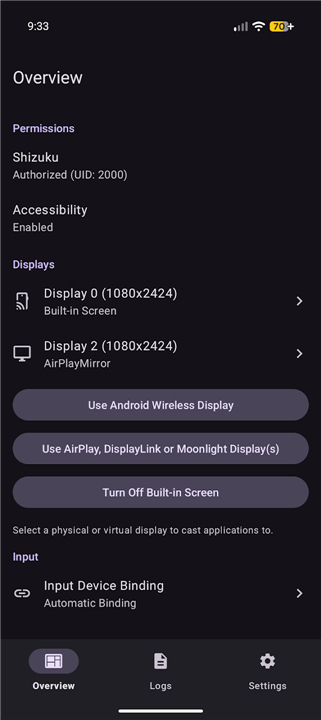
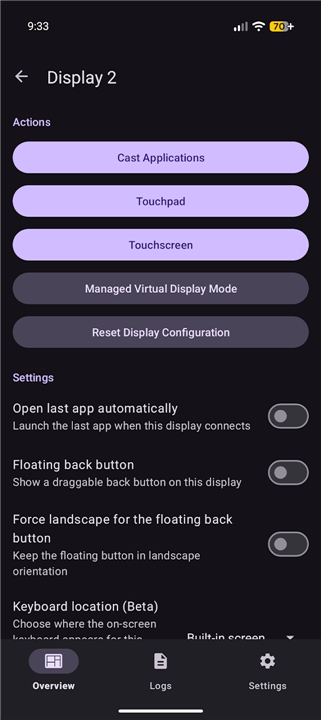
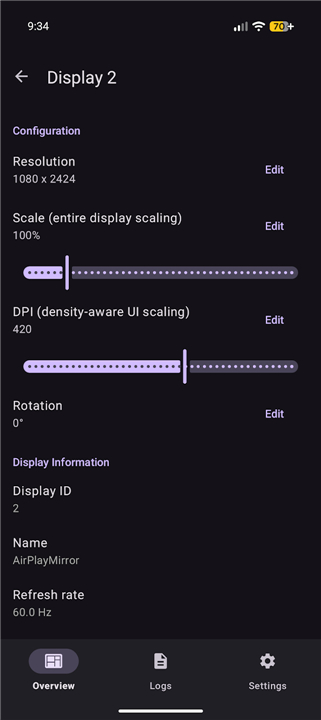
Display Manager for Android
Overview
• Display Manager for Android is a comprehensive utility designed to enhance the multi-screen experience for mobile devices.
• It provides users with granular control over how applications and interfaces interact with secondary monitors and virtual screens.
Display Customization and Output
• Launch any installed application on an external display in a dedicated full-screen mode for a desktop-like experience.
• Modify display parameters including resolution, scaling, density (DPI), and orientation for every connected monitor.
• Quickly restore any per-display configuration back to the original system default settings to resolve compatibility issues.
Input and Navigation Tools
• Utilize a built-in on-screen touchpad and keyboard to interact with content on any connected display without external peripherals.
• Access advanced touchpad features such as multi-touch gesture support, rotation-aware tracking, and a specialized digitizer-only mode.
• Navigate external interfaces using dedicated on-screen controls, including Back and Home buttons.
Device Management and Routing
• Assign specific external input devices to individual displays through a per-input and per-display routing system.
• Enable a managed virtual display mode that allows for customizable on-screen keyboard routing and unique windowing behaviors.
• Maintain active output on all external monitors while turning off the built-in device screen to save power and reduce heat.
Accessibility and Privacy
• Leverage the Accessibility Service API to simulate navigation actions for the touchpad and floating interface buttons.
• Use localized system data to render the on-screen cursor and identify focused windows to ensure input is directed to the correct display.
• Ensure data security: all information accessed via the Accessibility Service remains on the device and is never collected, stored, or shared.
• Source: https://github.com/jqssun/android-display-mirror
FAQ
Q: How does the app help with running apps on a larger screen?
A: One of the core features is the ability to launch any installed application directly onto a secondary monitor. When you do this, the app runs in a dedicated full-screen mode, which provides a much more immersive and functional experience than standard screen mirroring.
Q: Can I adjust the visual settings for different monitors?
A: Yes, the app allows you to modify specific display parameters for every monitor you connect. You can independently adjust the resolution, scaling, and pixel density (DPI), and even change the orientation to ensure the output perfectly fits the screen you are using.
Q: What should I do if my display settings become unstable?
A: If you encounter compatibility issues or realize a configuration isn't working as expected, the app includes a built-in safety feature. You can quickly restore any per-display configuration back to the original system default settings to resolve errors and get back to a stable view.
Version History
v0.0.26——23 Jul 2026
Optimize Android multi-screen setups with Display Manager. Custom resolution, DPI, and monitor controls with a built-in virtual touchpad. Download the latest version of Display Manager for Android to enjoy new features and updates immediately!
*0.0.26
Minor bug fixes and improvements. Install or update to the newest version to check it out!
*0.0.25
Minor bug fixes and improvements. Install or update to the newest version to check it out!
*0.0.24
Minor bug fixes and improvements. Install or update to the newest version to check it out!











Ratings and reviews
There are no reviews yet. Be the first one to write one.