

Cat® Inspect
Overview
• Cat® Inspect is a powerful yet user-friendly digital inspection application designed to simplify and enhance the process of equipment inspections.
• It is suitable for both Cat® equipment and non-Cat assets, making it a versatile tool for operators, service teams, and managers who need to maintain high standards of equipment performance, safety, and compliance.
Key Features
1. Pre-Defined Inspection Forms
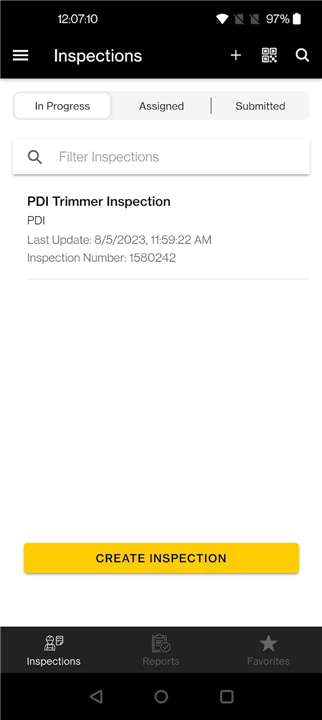
• Access a wide range of pre-set inspection templates tailored to specific machine models and asset types.
• Ensure inspections are consistent and meet industry or company standards.
• Reduce the need for manual paperwork by using digital checklists.
2. Customizable Input
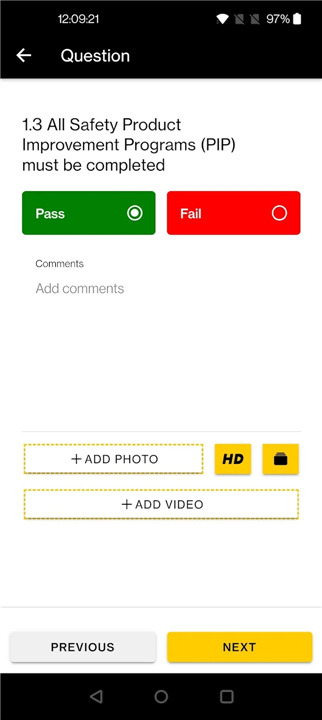
• Add detailed comments to capture observations, issues, or recommendations.
• Include photographic evidence directly from a mobile device to document asset conditions.
• Apply ratings or scores to highlight the severity or urgency of any issues found.
3. Compatibility
• Works with both Cat® and non-Cat equipment.
• Ideal for mixed fleets, allowing all inspection data to be stored in a central system.
Ease of Use
• Simple navigation and intuitive design enable quick learning for new users.
• Mobile-friendly interface allows inspections to be done in the field, even in remote locations.
• Offline functionality ensures inspections can be completed without internet access, with data syncing once connectivity is restored.
Data Access and Management
• Completed inspection reports are automatically uploaded to a secure, streamlined web portal.
• Managers can access historical inspection data for tracking performance trends.
• Inspection results can be used to schedule maintenance, address safety concerns, or identify opportunities for operational improvements.
Benefits for Businesses
• Supports proactive maintenance to reduce downtime.
• Improves safety compliance and record-keeping.
• Enhances communication between operators, service teams, and management.
FAQ
Q: Can I use Cat Inspect for equipment that isn’t made by Caterpillar?
A: Absolutely. Although Cat Inspect comes preloaded with inspection templates for a wide range of Cat machines, it’s also designed to handle non-Cat assets. You can apply the same digital workflows and data-management benefits to mixed fleets, ensuring every piece of equipment—regardless of brand—follows consistent inspection processes and centralized record-keeping.
Q: How do I access and customize the pre-defined inspection forms?
A: When you open the app, you’ll see a library of inspection forms sorted by equipment type and model. Simply select the form that matches your asset, and the checklist will load on your device. If you need to tailor the form, you can add custom questions, adjust the wording of existing items, or embed additional fields for notes and photos. These adjustments can be saved as a custom template for future inspections, helping you maintain consistency across your team.
Q: What’s the best way to add comments and photos during an inspection?
A: While conducting your inspection, every checklist item has an option to include additional details. Tapping the comment icon lets you type observations, note potential concerns, or suggest corrective actions. If you need visual evidence, you can launch your device’s camera right from the form and snap pictures of any issues. Each photo is linked directly to the corresponding checklist item, making it easy to review and act upon later.
Version History
v4.4.5——19 Jan 2026
Cat® Inspect allows users to download and complete pre-defined inspections. Download the latest version of Cat® Inspect to enjoy new features and updates immediately!
*4.4.5
Minor bug fixes
*4.4.4
Enhancement to logging of user consent; addition of option to revoke consent.
Enhancement to allow favouriting of forms in mobile, and automatic syncing of favourites between mobile and web applications.
*4.4.3
Minor bug fixes.









Ratings and reviews
There are no reviews yet. Be the first one to write one.