

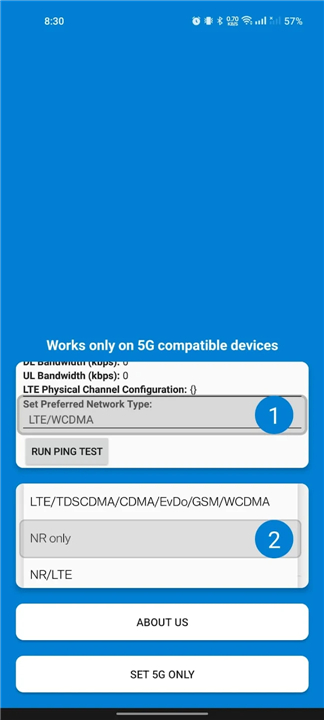
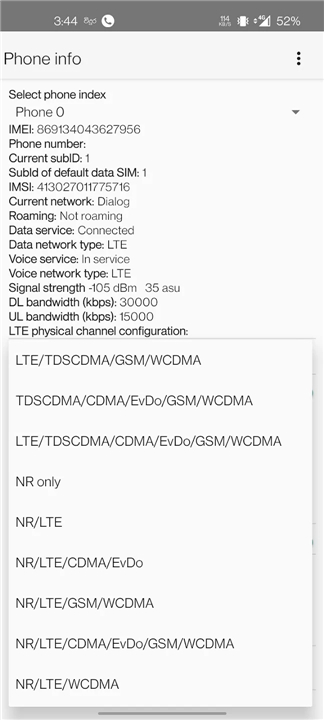
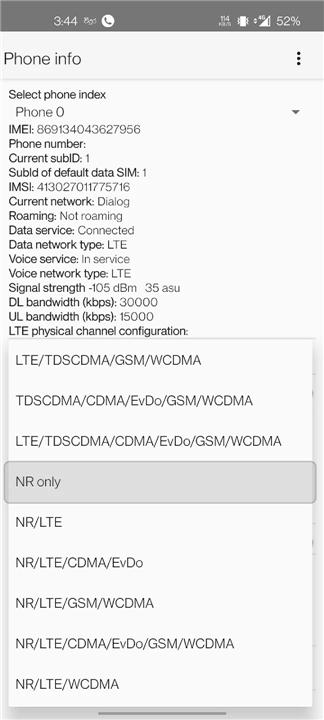
5G Only Network Mode
Take Control of Your Connection
• Your smartphone's automatic network switching often sacrifices stability and speed for convenience, leading to frustrating disconnections and slow downloads.
• This app empowers you to bypass those default settings, revealing hidden system controls to manually choose the perfect network mode for your situation.
Unlock Your Network's Potential
• Gain immediate access to advanced radio configurations typically hidden by manufacturers. .
• This allows you to tailor your connection for optimal performance or specific needs:
+ Lock to 5G (NR Only): Stay on the fastest available speeds, preventing your phone from downgrading to slower networks even with a slightly weaker signal. Perfect for high-bandwidth tasks.
+ Force 4G (LTE Only): Ensure rock-solid stability in areas where 5G is patchy, eliminating frequent disconnections and lag during gaming or streaming.
+ Prioritize 3G/2G (WCDMA/GSM Only): Extend battery life significantly and maintain essential call and text functionality in remote areas or when newer networks aren't available.
+ Create Hybrid Modes: Balance speed and reliability with combinations like 5G/4G (NR/LTE) or 4G/3G (LTE/WCDMA), adapting to various environmental needs.
Key Benefits at Your Fingertips
Manually selecting your network mode provides several practical advantages:
• Boost Connection Stability: Prevent constant network "searching" that drains battery and interrupts data, leading to smoother downloads and online experiences.
• Maximize Data Speeds: Override automatic throttling and keep your device on the fastest available network (like 5G), even if the signal isn't at full strength.
• Optimize Battery Life: Constant switching between network technologies uses significant power; locking to a single mode can noticeably extend your daily usage.
• Gain Technical Insights: Access real-time signal strength (in decibels) and other valuable network statistics to better understand your connection.
Easy Access, No Hassle
Forget complicated secret codes or developer expertise; this app makes advanced network control accessible to everyone:
• One-Tap Access: Launch the app and instantly jump to your phone's hidden "Phone Info" or "Radio Testing" menu.
• User-Friendly Design: No technical jargon or complex steps – just straightforward control made simple.
• Works on Android: Built using your phone's existing system settings, ensuring broad compatibility across various Android devices that support these bands.
• No Rooting Needed: Modify your network preferences safely without voiding your warranty or performing complex software modifications.
FAQ
Q: Why would I want to manually lock my phone to a specific network mode?
A: Your smartphone is programmed to switch between 5G, 4G, and 3G automatically to save power or find a stronger signal, but this often leads to frustrating disconnections and slower speeds during the handoff process. By manually locking the mode, you ensure that your phone stays on the fastest or most stable network available without the device constantly trying to "hunt" for a different signal.
Q: Is it possible to stay on 5G even when the signal strength is slightly weak?
A: Yes, by selecting the NR Only mode within the app, you can force your device to stay on 5G speeds, which prevents the software from downgrading you to 4G LTE. This is particularly helpful for high-bandwidth tasks like downloading large files or streaming high-definition video where you want to prioritize speed over all else.
Q: What are the benefits of forcing my phone into 4G LTE Only mode?
A: In many areas, 5G signals can be patchy or inconsistent, which causes your phone to jump back and forth between networks and results in lag. Forcing 4G LTE provides a rock-solid, stable connection that is perfect for online gaming or video conferencing where a consistent stream of data is more important than the absolute maximum peak speed.
Version History
v1.4.0——22 Apr 2026
Change your network mode to 5G only (NR only) Download the latest version of 5G Only Network Mode to enjoy new features and updates immediately!
*1.4.0
Added more bugs to fix later
*1.3.0
Added more bugs to fix later
*1.2.0
Compatibility upgrade for newer android versions











Ratings and reviews
There are no reviews yet. Be the first one to write one.