

Celestial Navigation 360 APK
1.7
Celestial Navigation 360
Celestial Navigation 360 APK
Download for Android

Celestial Navigation 360
Overview
• Celestial Navigation 360 is an offline-capable application designed for mariners, navigators, and enthusiasts of traditional navigation methods.
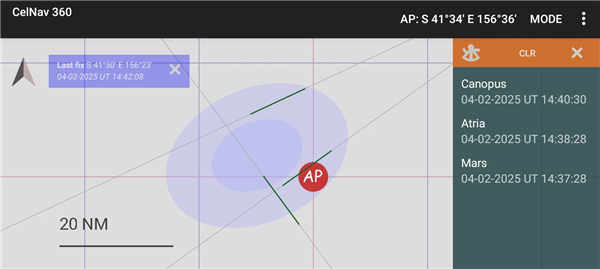
• It harnesses the core principle of celestial navigation: every measurement or “sight” taken with a sextant corresponds to a line of position (LOP) on a chart.
• By taking two or more sights of different celestial bodies, navigators can determine their exact position through the intersection of these lines.
• This app allows users to plan and enter sextant sights, visualize the resulting LOPs, and refine their position fixes without requiring an internet connection.
Core Features
1. Navigational Stars
• Includes the 58 officially recognized navigational stars listed in the Nautical Almanac, ensuring accuracy and consistency with established maritime standards.
2. Realtime Horizon Projection
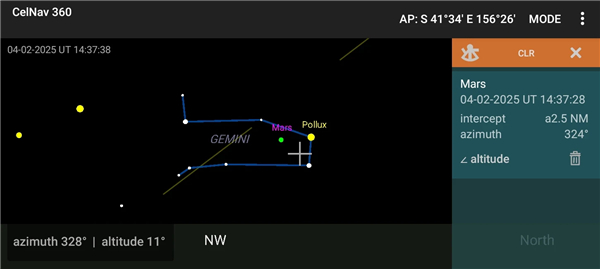
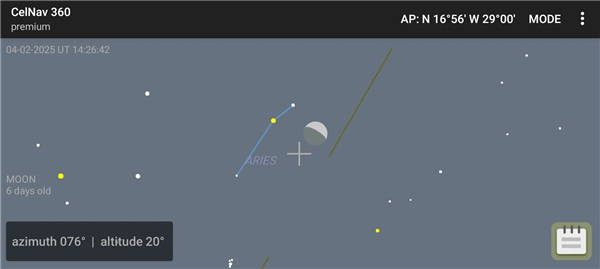
• Displays a computed horizon in panoramic projection, enabling users to identify stars and planets visually, prepare for sights, and determine true bearings directly from the app.
3. Sight Reduction & Ephemerides
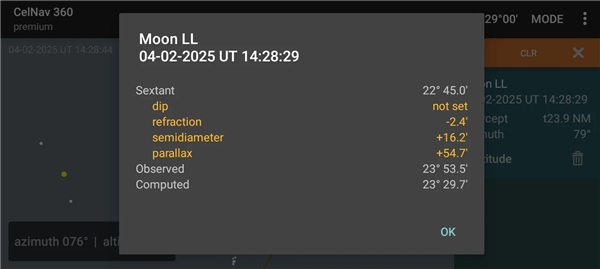
• Performs internal calculations for sight reduction without external data sources, generating precise ephemerides for the celestial bodies in use.
4. Line of Position Plotting
• Plots LOPs on a pan-and-zoom grid, centered on the assumed position using the intercept method. This visual aid helps with quick and accurate position fixes.
5. Integration with Angular Distance App
• Allows importing of sights taken with the companion “Angular Distance” app, which uses the device’s camera as a sextant substitute for quick angular measurements.
6. Rising and Setting Almanac
• Offers detailed information on the rising and setting times of navigational stars and celestial bodies for planning observations.
Lunar Distance to Universal Time Conversion
• Includes tools to convert measured lunar distances into Universal Time, useful for timekeeping and refining longitude determination.
Premium Subscription Features
• Extends all core functions to include the Sun, Moon, and planets.
• Enables full celestial body support for more comprehensive navigation scenarios.
• Enhances versatility for both oceanic voyages and educational use.
FAQ
Q: How does Celestial Navigation 360 translate a sextant sight into a line of position on the chart?
A: When you measure the altitude of a celestial body with your sextant, the app uses sight reduction algorithms to compute the intercept and true bearing. This calculation produces a line of position—a locus of possible positions that correspond to your sight. By plotting that LOP on the app’s pan‐and‐zoom grid and intersecting two or more LOPs, you obtain a precise fix.
Q: Is an internet connection necessary to use Celestial Navigation 360?
A: No, the app was designed with offline use in mind. All calculation libraries, ephemeris data for navigational stars, and the horizon‐projection engine are stored locally. This ensures reliable operation on the open ocean or in areas without cellular or Wi-Fi coverage.
Q: Which celestial bodies are available in the free version, and what do I get with the premium subscription?
A: In its core free edition, Celestial Navigation 360 offers all 58 officially recognized navigational stars from the Nautical Almanac. Upgrading to the premium subscription unlocks the Sun, Moon, and planets, providing full celestial-body support for more complex or long-distance passages and expanding your navigational options.
Version History
v1.7——23 Dec 2025
Determine your geographical position from the sun, moon, stars and planets Download the latest version of Celestial Navigation 360 to enjoy new features and updates immediately!
*1.7
- Lunars conversion to UT
- realtime GHA Aries, and star SHAs
- Import sights from Angular Distance app
*1.6
- support for 16 KB devices, and fixed a layout misalignment issue affecting Android 15 devices
- menu options to view Assumed Position in Google Maps, and to view Getting Started quick guide (external webpage)
- compatibility with Angular Distance, an app that measures celestial altitudes via the camera, separately available on Google Play
- month or year subscription for premium features (replacing one-time purchase)
*1.5
Battery-saving optimizations









Ratings and reviews
There are no reviews yet. Be the first one to write one.