



Mobile Security for Android delivers robust and all-encompassing defense against online dangers.
Celebrated as the “Best Android Security” by AV-Test for three consecutive years (2022, 2021, 2020), our Mobile Security & Antivirus solution is a proven winner. Begin your free 14-day trial today.
Featuring an Advanced AI scan that achieves 100% detection of malicious apps, it shields you from viruses, spam, scams, identity theft, ransomware, spyware, privacy breaches, crypto fraud, and counterfeit ChatGPT applications.
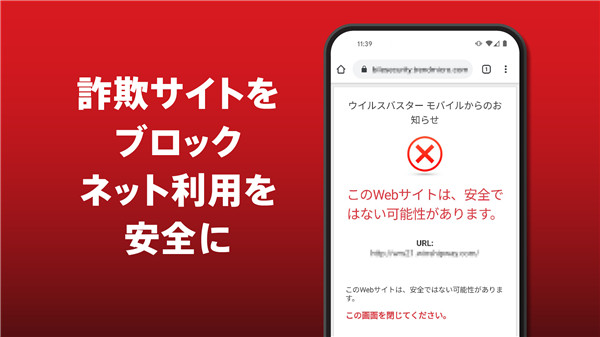
Web Guard offers protection against fraud, phishing attempts, and harmful links in browsers and popular applications through sophisticated detection methods and a secure local VPN.
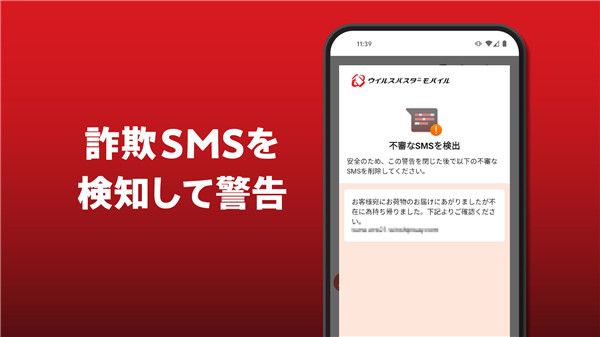
Fraud Buster actively scans, identifies, and reports suspicious, harmful, spam, and fraudulent text messages, app notifications, and calls using cutting-edge scam-blocking technology, including AI-generated messages like those from ChatGPT.
Our top-tier tools, utilities, and scanners notify you of potential threats, allowing you to browse, email, bank, and shop safely, while also freeing up memory and enabling you to lock specific apps and websites from unauthorized access.
Keep an eye on links in text messages, Gmail, Facebook, Instagram, Line, Twitter, Telegram, WhatsApp, and other popular platforms to receive alerts about potential risks before you click.
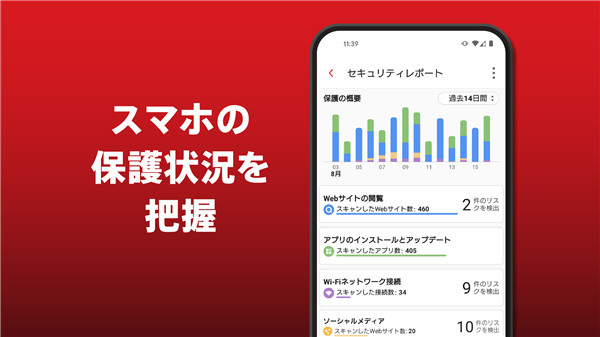
The Security Report keeps you informed about the security status of all your protected activities over the past 30 days.
™️ With over 30 years of experience in security software, Trend Micro has been dedicated to safeguarding millions of users in the mobile realm.
Your go-to expert for safety and security
Antivirus Scan
Automatically identifies ransomware, spyware, malware, and online threats
Pre-Installation Scan
Detects malware in apps before they are installed
Pay Guard Mobile
Enhances security for your banking and financial applications, protecting you from fraudulent banking, financial, and shopping apps that seek your personal information
Fraud Buster
Scans for and identifies fraudulent text messages, calls, and scams, while checking notifications for potential security risks
Web Guard
Protects you from suspicious and harmful websites with real-time phishing detection powered by our advanced machine-learning AI
Privacy Scanner
Assists in uncovering privacy issues within your Facebook and Twitter account settings
Wi-Fi Checker
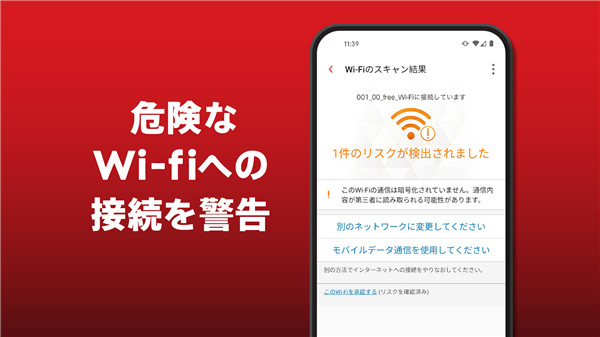
Notifies you if a Wi-Fi network is insecure or has been compromised by hackers
Memory Booster
Helps optimize your device's memory and minimize usage
Parental Control
Restricts access to apps (including system settings) from unauthorized users and filters websites to shield your children from harmful content, including AI-generated material
Secret Snap
Utilizes your front-facing camera to capture images of unauthorized access attempts on your device
Lost Device Protection & Anti-Theft
Enables you to locate, lock, or erase a lost device, aiding in recovery from cyber threats
App Manager
Simplifies the process of removing apps and freeing up storage space
Privacy Matters
Trend Micro Mobile Security prioritizes your network safety and online privacy. For further details, visit https://www.trendmicro.com/en_us/about/legal/privacy/notice-html.html.
To ensure the best protection and service, the following permissions are necessary:
Accessibility:
To gather data on websites you visit via the Accessibility services API and to alert you when harmful sites are identified
Run in the background:
To keep your device secure even when the app is not actively in use
Draw over other apps:
To display important alerts
Location:
To enable remote control of your device and assess Wi-Fi networks for potential threats
SMS & Notifications:
To scan and block unwanted text messages and notifications
Call:
This permission allows the app to access your call log and provide caller ID, spam, and scam alerts within the app
Device Administrator:
To detect unauthorized attempts to unlock your device or to perform a wipe in case of theft or loss.
FAQ
Q: What features does Trend Micro VirusBuster Mobile offer to protect my device?
A: Trend Micro VirusBuster Mobile provides a range of features including an Antivirus Scan to identify malware, a Pre-Installation Scan for apps, Web Guard for safe browsing, Pay Guard for secure banking, Fraud Buster for scanning suspicious messages and calls, and a Privacy Scanner for social media accounts. Additionally, it includes a Lost Device Protection feature and Parental Control options.
Q: How does the Advanced AI scan work?
A: The Advanced AI scan utilizes sophisticated technology to detect and identify malicious apps with 100% accuracy. It actively scans your device for threats like viruses, spyware, and ransomware, ensuring your mobile experience is safe and secure.
Q: Is there a trial period for the app, and how can I start it?
A: Yes! You can begin a free 14-day trial of Trend Micro Mobile Security. Simply download the app from the Google Play Store, and follow the prompts to activate your trial and explore all the available features.
-----------------
What's New in the Latest Version 1.1.2
Last updated on Nov 14, 2024
Trend Micro VirusBuster Mobile is a simple, reliable security solution. Download the latest version of VirusBuster Mobile 17.1.0 to enjoy new features and updates immediately!
Minor bug fixes and improvements. Install or update to the newest version to check it out!









Ratings and reviews
There are no reviews yet. Be the first one to write one.