



geteduroam
Simplified eduroam Network Configuration
• geteduroam is an official, dedicated utility specifically designed to streamline and secure the configuration process for the eduroam (education roaming) Wi-Fi network.
• It effectively simplifies the often complex task of connecting to institution-grade secure wireless environments.
The Configuration Process
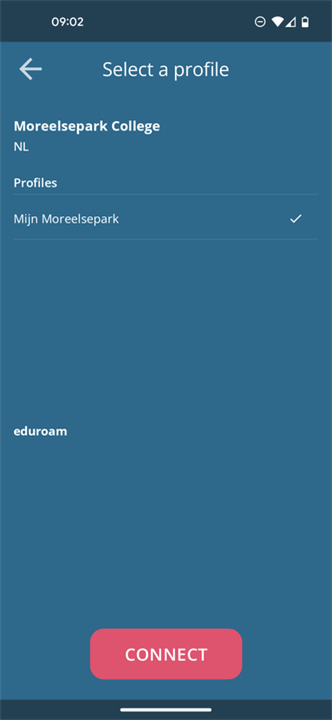
1. Profile Selection:
• Users begin by selecting the precise eduroam CAT (Configuration Assistant Tool) profile relevant to their home institution.
• These profiles are meticulously created by academic and research organizations, embedding all necessary institution-specific network settings and security parameters.
2. Credential Input:
• Upon selecting the appropriate profile, users are prompted to securely enter their institutional login credentials, typically a username and password associated with their university or research facility.
3. Automated Setup:
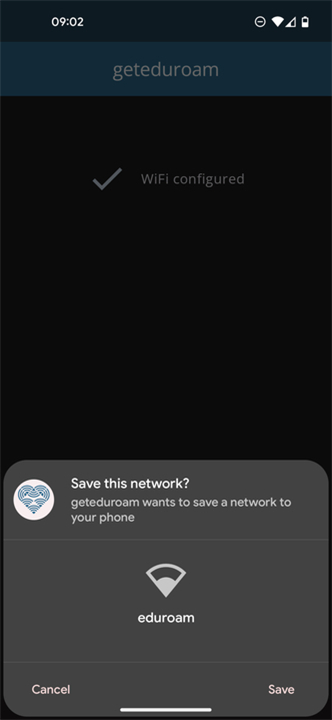
• The geteduroam tool then intelligently and automatically configures the user's device.
• This includes installing required security certificates, setting up robust WPA2-Enterprise protocols, and ensuring proper server validation to protect against security threats.
4. Immediate Connectivity:
• Once the configuration is successfully completed, the eduroam network connection is fully established and ready for immediate, secure use.
Key Advantages
1. Enhanced Security:
• Ensures adherence to stringent security standards by correctly validating network servers and implementing robust encryption, significantly mitigating common wireless vulnerabilities.
2. User Accessibility:
• Transforms a potentially technical setup into an intuitive, guided process, making secure eduroam access simple for all users regardless of technical proficiency.
3. Consistency & Reliability:
• Guarantees a standardized, correct, and dependable eduroam connection across a wide range of devices and operating systems.
Official Development & Global Scope
• Developed directly by the official eduroam® project, geteduroam stands as the definitive trusted tool for secure connectivity.
• Its design supports eduroam's global infrastructure, making it an essential utility for students, researchers, and staff connecting to eduroam secure networks worldwide.
FAQ
Q: How does the profile selection step work when I first open the utility?
A: When you start geteduroam, your first step is to search for and select your home institution. This matches your device with the precise eduroam Configuration Assistant Tool profile that your university or research facility meticulously created to contain your specific network and security parameters.
Q: What kind of credentials do I need to log in to geteduroam?
A: You will need the official login details provided by your home institution, which usually consist of your university username and password. The application will securely prompt you for these details right after you select your correct institution profile.
Q: What does geteduroam do during the automated setup phase?
A: Once you enter your login details, the clever utility takes over to do the heavy lifting for you. It automatically installs the necessary security certificates, configures robust WPA2-Enterprise protocols, and sets up proper server validation so you do not have to configure these technical settings yourself.
Version History
v2.3.0——27 Jul 2026
Configure eduroam by using your institution profile Download the latest version of geteduroam to enjoy new features and updates immediately!
*2.3.0
This version brings a solution for users that have phones with Apps going in Hibernation / Deep Sleep: it will guide you to the right settings when notifications are required.
It fixes crashes for organizations that provide logo's too big for some smaller devices to process.
This version allows profiles pre-filled with password-based credentials.
This version allows other browsers (such as Edge) to work with Custom Tabs.
*2.2.0
This version brings a solution for users that have phones with Apps going in Hibernation / Deep Sleep: it will guide you to the right settings when notifications are required.
It fixes crashes for organizations that provide logo's too big for some smaller devices to process.
This version allows profiles pre-filled with password-based credentials.
*2.1.7
Fixed an issue that could cause the application to crash when renewing a certificate.
Fixed an issue that could cause the application to crash when processing multiple WiFi suggestions.











Ratings and reviews
There are no reviews yet. Be the first one to write one.