


Banana Browser is a fast, secure, and feature-rich web browser built on the world’s most widely used browser engine. It provides a smooth browsing experience with added security features and convenient extensions, ensuring that your online experience is free from annoying ads, potential privacy risks, and unnecessary data usage.
Adblock
Say goodbye to annoying pop-up ads and malicious content! Banana Browser comes with a built-in Adblocker that ensures you browse the web free from intrusive ads.
Secure DNS Over HTTP(S)
Worried about website restrictions or privacy concerns? Banana Browser offers Secure DNS over HTTP(S), allowing you to bypass website blocks and enhance your privacy. Unlike VPNs, it doesn’t rely on servers to store your data, meaning your online activities are never logged.
Secure Login
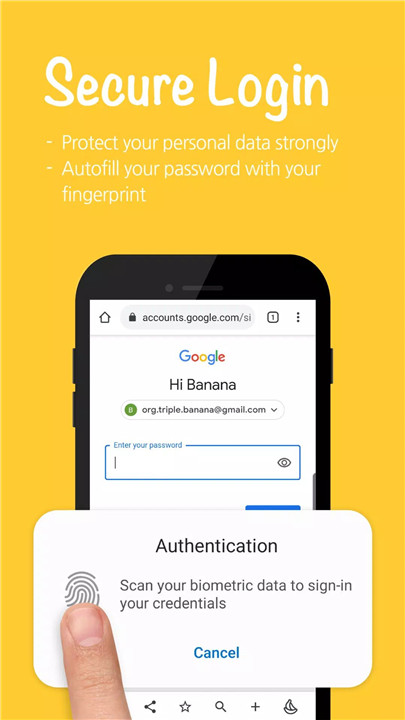
Forget the stress of remembering passwords! With Banana Browser's Secure Login feature, you can securely log in to your accounts using biometrics, such as your fingerprint, pattern, or PIN. Your account information is encrypted and never stored or sent to external servers.
Dark Mode
Banana Browser has a built-in Dark Mode to help you browse with ease, especially during nighttime. This mode reduces eye strain by switching to a dark theme, making long browsing sessions more comfortable. It also helps save battery life, so you can browse for longer without worrying about your device’s power consumption.
Toolbar Editor
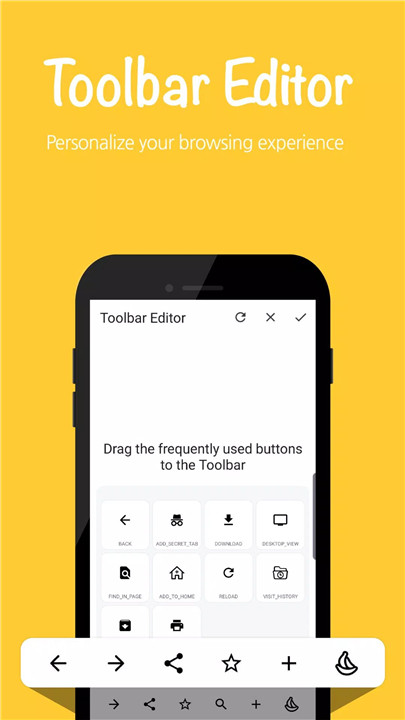
Customizing your browser’s interface has never been easier. Banana Browser’s Toolbar Editor lets you organize and place your favorite functions on the bottom toolbar.
Data Saving
Concerned about mobile data usage? Banana Browser has a Data Saving mode that reduces mobile data consumption by up to 60%. Not only does it make web pages load faster, but it also helps you save on data costs, making it the perfect browser for users with limited mobile data.
Bookmarks Import/Export
Transitioning to Banana Browser is seamless, even if you’ve already saved bookmarks in other browsers. With the bookmarks import/export feature, you can easily transfer your bookmarks to and from Banana Browser.
FAQs
1. What is Banana Browser?
Banana Browser is a fast and secure browser with built-in features such as Adblock, Secure DNS, Dark Mode, and more, designed to provide a superior browsing experience.
2. How does the Adblock feature work?
The Adblock feature blocks unwanted ads from websites, ensuring a smoother and more enjoyable browsing experience without interruptions.
3. Can I use biometrics to log into websites?
Yes! Banana Browser’s Secure Login allows you to log in using your fingerprint, pattern, or PIN for faster and more secure access to your accounts.
4. How does Dark Mode help with browsing?
Dark Mode reduces eye strain during nighttime browsing and can also help save battery life by using darker themes in the browser.
5. Can I import my bookmarks from other browsers?
Yes! Banana Browser allows you to import bookmarks from other browsers and export them as well, ensuring a smooth transition and access to your saved sites.
Version History
v19.06 @ 133.0.6943.138.3—23 Mar, 2025
Chromium Engine 133.0.6943.138
Significant performance improvements
Support ChatGPT with AI feature
Support Sponsor Blocker on YTube
Block third-party cookies
Improve AdBlocker
External download manager (ADM / IDM)
Powerful media features
Browser Lock for privacy protection
Bypass website blocks via Secure DNS over HTTP(S)
Dark Mode
Secure Login
Toolbar Editor
Mobile data saving
Bookmarks Import/Export
v19.06 @ 133.0.6943.138.3—23 Mar, 2025
Chromium Engine 133.0.6943.138
Significant performance improvements
Support ChatGPT with AI feature
Support Sponsor Blocker on YTube
Block third-party cookies
Improve AdBlocker
External download manager (ADM / IDM)
Powerful media features
Browser Lock for privacy protection
Bypass website blocks via Secure DNS over HTTP(S)
Dark Mode
Secure Login
Toolbar Editor
Mobile data saving
Bookmarks Import/Export
v18.05 @ 126.0.6478.72.3—30 Jul, 2024
Chromium Engine 126.0.6478.72
Significant performance improvements
Support ChatGPT with AI feature
Improve rendering performance
Block third-party cookies
Improve AdBlocker
External download manager (ADM / IDM)
Powerful media features
Browser Lock for privacy protection
Bypass website blocks via Secure DNS over HTTP(S)
Dark Mode
Secure Login
Toolbar Editor
Mobile data saving
Bookmarks Import/Export









Ratings and reviews
There are no reviews yet. Be the first one to write one.