

FotoAI - AI Emoji Keyboard APK
2.0.7
FotoAI - AI Emoji Keyboard
FotoAI - AI Emoji Keyboard APK
Download for Android



✦ Introduction ✦
Elevate your typing experience with FotoAI Emoji Keyboard, a revolutionary AI-powered keyboard that combines functionality and style! Designed to enhance digital communication, FotoAI offers a plethora of features including unique fonts, extensive emoji collections, and customizable themes.
✦ App Features ✦
Premium AI Keyboard
FotoAI’s advanced AI helps you craft the most creative bios, hashtags, and social media posts. Generate eye-catching Instagram bios, stylish Facebook posts, and engaging Snapchat texts effortlessly.
Helpful AI Assistant
The AI assistant is always on hand to provide quick answers and make your typing experience smoother by paraphrasing captions and texts without unnecessary synonyms.
Emojis and Stickers
FotoAI empowers you to communicate expressively with 500+ emojis, emoticons, and stickers.
Custom Photo Keyboard Themes
Personalize your keyboard with 1000+ custom themes, or add your own photos. New themes are added weekly, and you can even customize button designs, fonts, and sounds.
Insta Fonts Keyboard
Break away from conventional fonts with 100+ stylish options. Add flair to your social media profiles and surprise friends with enchanting text styles that stand out.
Text Art and Kaomojis
Explore over 100 text arts and Kaomojis for a unique way to express yourself beyond standard emojis. These elaborative designs add a creative touch to your messages.
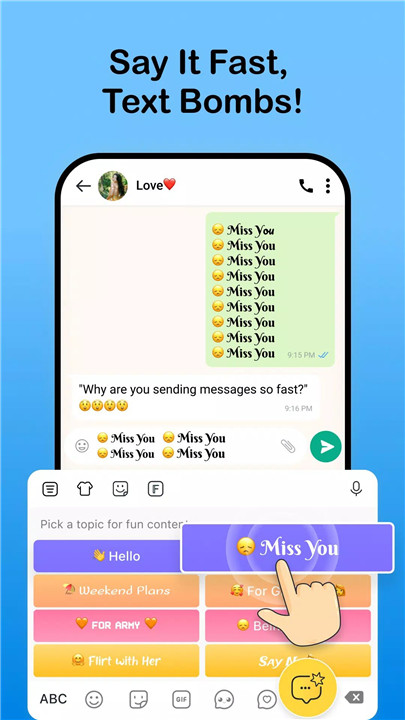
Text Bomb
Easily send multiple messages to bombard your friends without typing multiple messages with the Text Bomb feature.
Fun Chat Features
Enhance your WhatsApp, TikTok, and Instagram chats with memes, frizzed-up texts, and more using our fun chat options.
Swipe Dictionary
Save time with the Swipe Dictionary. Pre-save phrases and quickly input them by swiping specific shapes or letters, making your typing swift and efficient.
------------------------------------------
What's New in the Latest Version 2.0.7
Last updated on Aug 12, 2024
Introduced AI Avatar
Added new Face Stickers
Enhanced keyboard with Language Key and Emoji Key
Various bug fixes and product enhancements









Ratings and reviews
There are no reviews yet. Be the first one to write one.