

Mirroring (AirPlay & Sunshine) APK
0.0.28
Mirroring (AirPlay & Sunshine)
Mirroring (AirPlay & Sunshine) APK
Download for Android
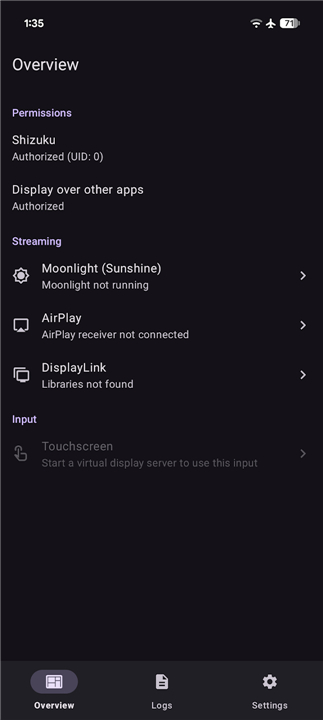
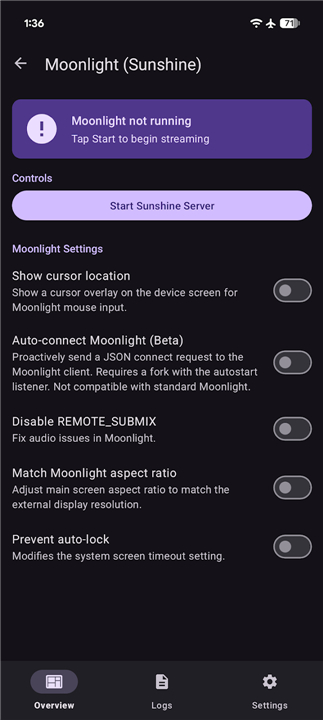
Mirroring (AirPlay & Sunshine)
Advanced Display Mirroring and Connectivity Features
• The system offers a comprehensive suite of tools for display mirroring and remote connectivity, designed to facilitate versatile screen sharing and device interaction.
Wireless Mirroring and Streaming
1. AirPlay Support:
• Enables robust outbound screen mirroring to a wide array of destinations.
• It supports both the modern AirPlay 2 protocol for enhanced synchronization and legacy AirPlay 1 for compatibility with older hardware and third-party receivers.
2. Moonlight and Sunshine Integration:
• Features a built-in Sunshine server to facilitate high-performance outbound streaming.
• This allows users to leverage Moonlight clients for low-latency remote control and gaming experiences.
Hardware and Virtual Display Management
1. DisplayLink Connectivity:
• Provides native support for DisplayLink USB output, compatible with both USB 2.0 and USB 3.0 host modes, allowing for expanded display configurations via external adapters.
2. Virtual Display Architecture:
• Each recognized display sink is registered as an independent virtual display within the operating system.
• This architectural choice enables other applications to treat these sinks as secondary monitors, allowing for precise window management and the launching of specific activities onto mirrored environments.
Input and Interaction Control
• Touchscreen Relay:
+ Facilitates seamless interaction between the host and the remote receiver.
+ The system includes a sophisticated relay driver that translates local touch events, pointer movements, and keyboard input into inputs directed specifically at the mirrored display.
+ This ensures that users retain full navigational control over remote interfaces as if they were interacting with the primary display directly.
This integrated approach transforms the device into a flexible hub, capable of bridging mobile environments with desktop-class external displays and remote streaming protocols.
FAQ
Q: What is the benefit of using the built-in Sunshine server?
A: The Sunshine server is integrated directly into the system to provide high-performance outbound streaming. When paired with a Moonlight client, it offers exceptionally low latency, making it the ideal solution for remote gaming or demanding professional tasks that require a snappy, real-time connection.
Q: How does the virtual display architecture handle multiple connected sinks?
A: Whenever a display sink is recognized, the system treats it as an independent virtual display within the operating system. This allows your applications to identify these sinks as individual secondary monitors, giving you greater control over window placement and the ability to launch specific tasks onto a mirrored environment.
Q: Will I be able to control my host device from a remote touchscreen?
A: Absolutely. Thanks to our sophisticated touch relay driver, the system captures your pointer movements, keyboard inputs, and touch events on the remote receiver and translates them back to the host. You will feel as though you are interacting with the host device directly, even when you are working remotely.
Version History
v0.0.28——6 Jul 2026
Experience seamless display mirroring with AirPlay, Sunshine, and Moonlight support. Enjoy low-latency streaming and touch relay. Download the latest version of Mirroring (AirPlay & Sunshine) to enjoy new features and updates immediately!
*0.0.28
Minor bug fixes and improvements. Install or update to the newest version to check it out!
*0.0.27
Minor bug fixes and improvements. Install or update to the newest version to check it out!
*0.0.26
Minor bug fixes and improvements. Install or update to the newest version to check it out!











Ratings and reviews
There are no reviews yet. Be the first one to write one.